
Building a Raspberry Pi Compute Cluster in the era of AI
Published:
This is not another tutorial on how to build a Raspberry Pi SLURM Cluster
Originally published on Medium.
Building a Raspberry Pi Compute Cluster in the era of AI
By Manuel A. Diaz — July 2026
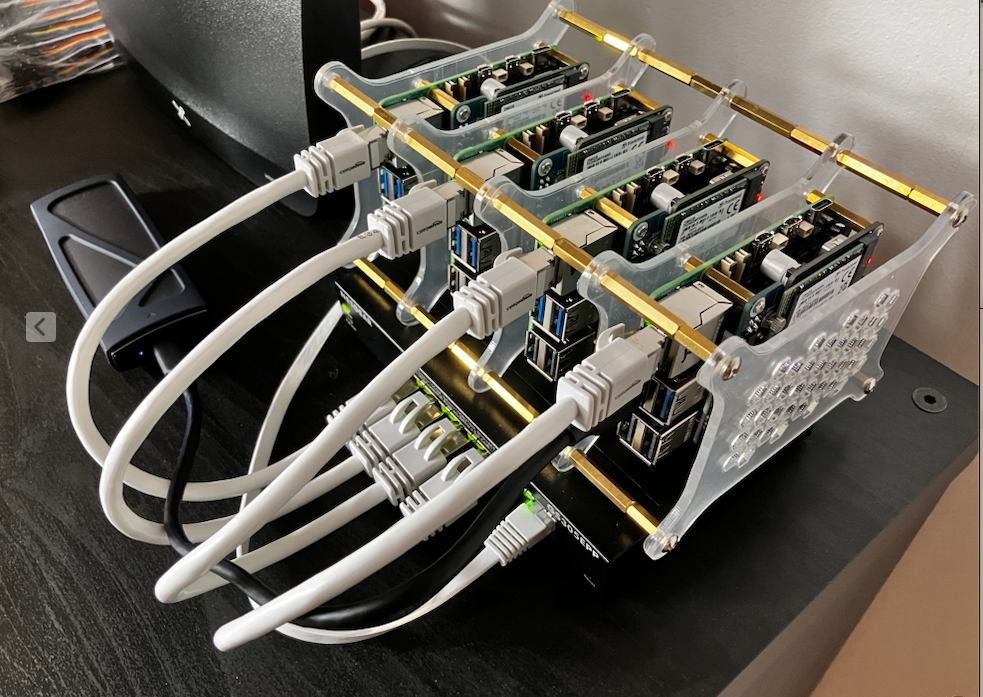
Strictly speaking, building a small compute cluster is not a difficult task—if you already know your hardware and your software stack. That is a large if.
I am a CFD engineer and researcher. What I need at home is modest: a handful of cores, tens of gigabytes of RAM, and a familiar SLURM workflow so I can prototype ideas before I burn queue time on a real supercomputer. Four Raspberry Pi 5 boards (16 GB each), NVMe boot, PoE, and a USB disk for shared storage looked like a reasonable answer. The goal was never to become a full-time systems administrator. It was to use a pico-cluster—to write Julia, C++, and Python, run MPI jobs, and experiment with algorithms.
That is where the story gets interesting, and where most “build a Pi cluster in a weekend” posts stop being useful.
The stack moves faster than the tutorials
Hobby compute has a quiet problem: the literature ages badly. Guides written for Raspberry Pi 4, Ubuntu 22.04, or a Kubernetes-first layout do not map cleanly onto a Pi 5 running Raspberry Pi OS Lite on Debian Trixie, booting from third-party M.2 + PoE HATs, and aiming for a pure compute SLURM environment rather than K3s. Package names shift. Bootloader flags change. Memory cgroups behave differently. OpenMPI trips over dual-stack networking. Cloud-init rewrites /etc/hosts after you thought networking was done.
So the first research pass—reading what other hobbyists did—is both necessary and misleading. You borrow confidence from someone else’s successful afternoon, then spend three evenings discovering that their assumptions were never yours. In a world where hardware revisions and OS images turn over quickly, “follow this tutorial” is often the wrong contract. The right contract is: encode what is known to work, and keep updating that encoding when reality disagrees.
What AI actually helped with
Having an agentic AI act as a junior systems engineer closed a real gap. Given a careful prompt, it can draft a clean installation guide, produce idempotent Bash scripts, and structure a bring-up the way an experienced admin would: base system, network, users, time sync, NFS, MUNGE, SLURM, ops scripts for start/stop/reboot. That scaffolding matters. Compute hobbyists should not have to invent the order of operations from first principles every time Debian cuts a new release.
But AI does not dissolve hardware. When the PoE HAT and a USB-C supply must never be connected together, when slurmctld dies because Pi OS Lite has no mail agent, when clocks drift and MUNGE rejects credentials, when Gen 3 NVMe is flaky on a particular drive—you are back in low-level troubleshooting: dmesg, journalctl, fstab, EEPROM config, systemd overrides. That part of the journey was not optional for me. It was where I stopped being only a user of SLURM and started becoming a junior administrator of a very small machine room on a desk.
I do not see that as a failure of AI. I see it as the correct division of labor. The agent accelerates the known procedure. The human (and the lab notebook of failures) owns the caveats.
Three things worth saying out loud
After the cluster passed stress tests and Julia GEMM benchmarks showed we could reach the performance the hardware actually offers, three messages felt worth communicating—more than another step-by-step clone of SchedMD’s quickstart on four SD cards.
1. Proven constraints beat generic best practices.
Enterprise defaults are not sacred on a four-node Pi cluster. Our working configuration disables SLURM cgroup enforcement (proctrack/linuxproc), uses a single compute partition, runs slurmctld as root via a systemd override, and ships a no-op MailProg stub because Lite has no MTA. Textbook advice would push cgroup v2 and memory limits on day one. On this stack, that path was a distraction. What mattered was a configuration that ran jobs and let users saturate the CPUs for real workloads.
2. Caveats are the product, not the footnotes.
The valuable list is ugly and specific: never dual-power PoE and USB-C; disable cloud-init after fixing /etc/hosts; mount the USB disk by UUID with nofail; unmount NFS clients before powering off the head node; force OpenMPI onto IPv4 (btl_tcp_disable_family=6); install libpmix-dev if you set MpiDefault=pmix. These are the landmines that turn a Saturday project into a week. Writing them down—and teaching an AI prompt to treat them as requirements, not optional research notes—is how the next person avoids relearning them the hard way.
3. The method is iterative: prompt → generate → bring up → capture failure → update the prompt.
We did not publish a frozen “ultimate 2026 guide” and walk away. We started with a rough prompt, generated a guide and scripts, broke them against real boards, and fed the scars back into a matured prompt and a corrected guide. The objective was never a perfect one-shot. It was a process that can survive the next OS image and the next HAT revision—so CFD people can stay focused on algorithms, not on rediscovering why slurmctld refuses to start.
Conclusion: reuse the artifacts, not the vibes
If you are a compute hobbyist who wants a pico-cluster without becoming a full-time SRE, do not start by copying a random blog post from three Pi generations ago. Start with artifacts that were validated against a living stack and written so an AI can regenerate the boring parts without inventing the wrong cluster.
In this repository, the reusable core is:
documents/prompt_final.md— a matured prompt that encodes live network layout, proven SLURM settings, must-include caveats, and script rules. Give this to an agent when your OS or package versions drift; ask it to regenerate or adjust the guide and scripts without discarding the proven constraints.documents/guide.md— the human-readable bring-up and troubleshooting path, including the operational caveats table.scripts/(seescripts/scripts.md) — idempotent head-node, compute-node, and ops scripts for rebuild and day-2 management.
Use the AI for scaffolding and for keeping documentation aligned with the prompt. Use the guide’s caveats when something fails in the metal. Use the scripts when you want to rebuild without retyping tribal knowledge. And treat your own failures the same way we did: write them back into the prompt so the next iteration is stricter and kinder.
That is the point of building a compute cluster in the era of AI. Not another tutorial that pretends the stack stands still—but a small, honest pipeline from hardware reality to something you can actually run GEMMs on, then go back to the science that made you want the cluster in the first place.
Cheers!